Built for UK Construction

Stop answering
"how's it going?"
for good.

Give your construction clients a live project health dashboard. Updated in 5 minutes each week. No spreadsheets. No client logins. Just one link.

A real dashboard โ€” exactly what your client sees. No sign-up needed.

app.siteglance.co.uk/projects/harbour-view
๐Ÿ”’
Harbour View Apts
Hartwell Developments ยท 31 Mar 2026
Edit Update
Client view
โš™
Progress
36%
Days Remaining
45
of 180 total
Stages Complete
3/5
Overall RAG
On Track
Timeline
Completed
In Progress
Upcoming
Groundworks
Structure
Roofing
M&E First Fix
Fit Out
5 min
weekly update time
0
client logins needed
1
link your client bookmarks
UK
data stored & hosted

How it works

Three steps to a client who's always informed.

01

Create your project

Add your stages, timeline, budget, and site postcode. Your project is live immediately.

02

Publish your update

Drag progress up to date, add notes, and let AI draft the project narrative. Review and publish.

03

Share the link

Your client opens a link and sees a live professional dashboard โ€” no account, no app, no chasing you for an update.
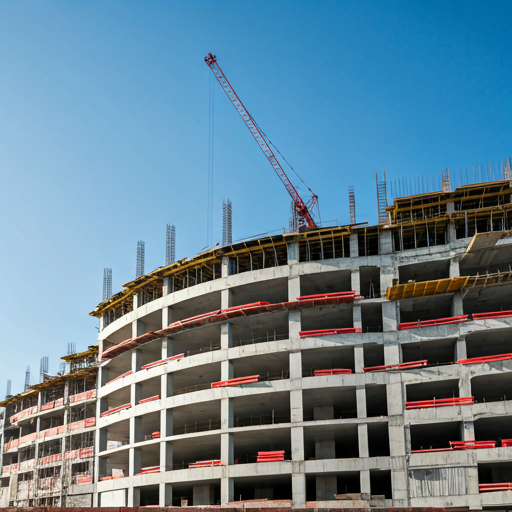
Construction site under development

Built for real sites

From groundworks to handover.
Always in the picture.

For builders, main contractors and project managers who report to clients โ€” SiteGlance keeps everyone informed at every stage, without you lifting the phone.

See a live example

Features

The full picture. In one place.

Real screenshots from the live example dashboard โ€” open it any time.

The client view

One link. The whole picture.

Your client opens their link and sees project health in seconds โ€” overall progress, stage by stage, with schedule, budget and risk status. Every visit opens with what's changed since the last update โ€” progress, forecast and new risks, called out automatically. No account, no app, no chasing.

See it live
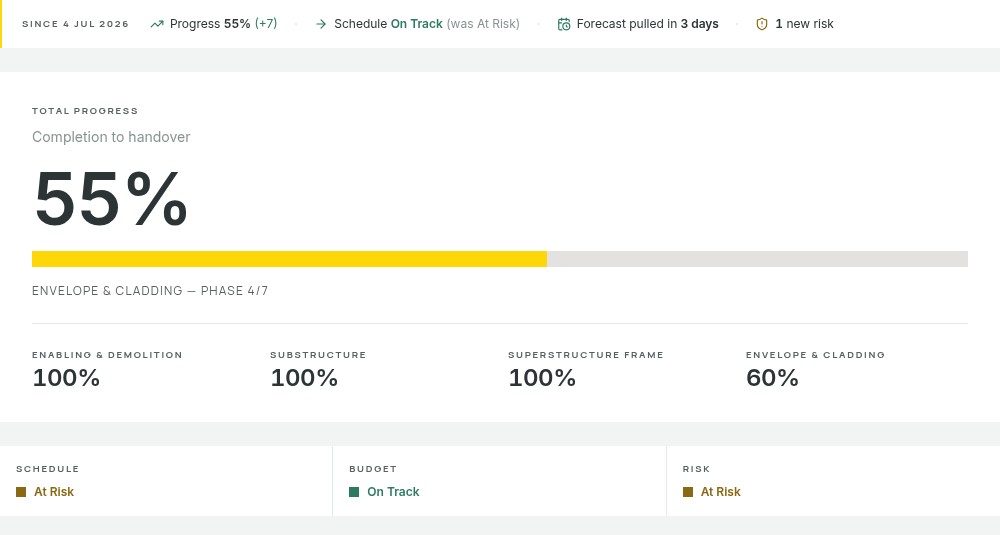
SiteGlance client dashboard โ€” what-changed strip, total progress and schedule, budget and risk status
AI summaries

The update writes itself.

Drag progress up to date and AI drafts the narrative โ€” highlights, concerns and what's coming up, in plain client-friendly language. Review, tweak, publish. Five minutes, start to finish.

See it live
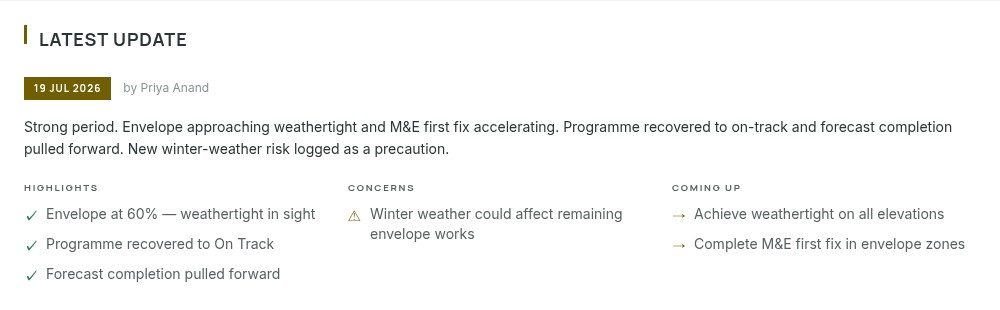
SiteGlance weekly update โ€” AI-drafted narrative with highlights, concerns and coming up
Risk register

Show them you're ahead of it.

Log risks as you spot them and your client sees a live register with a 3ร—3 heat map โ€” proof you're managing problems, not sitting on them. Severity, category and status, all in the open.

See it live
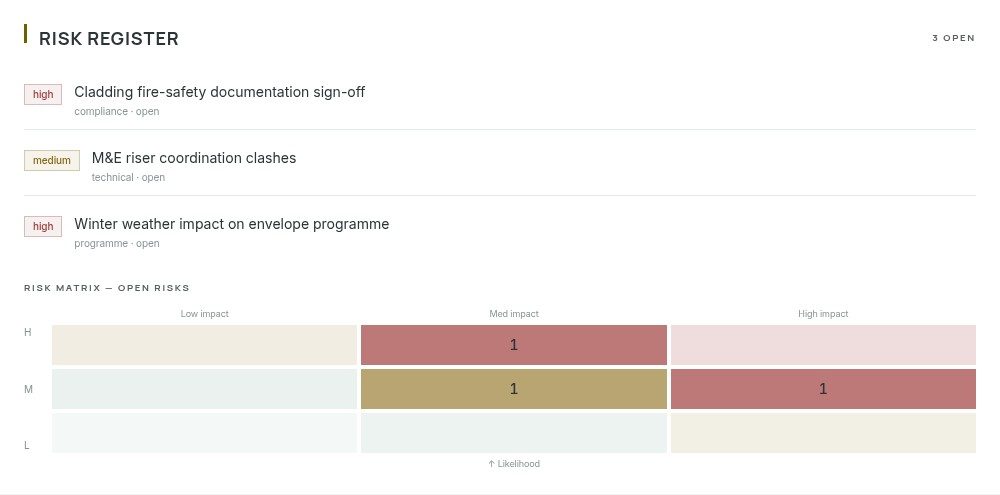
SiteGlance risk register โ€” open risks with severity badges and a 3ร—3 heat map

Client Email Digests

Clients subscribe once and get a branded email whenever you publish โ€” what moved, what changed, one click back to the dashboard.

Client Questions

Verified clients ask questions right on the dashboard. You reply from SiteGlance โ€” no phone tag, and the answer stays visible.

AI Monthly Reports

One click compiles the month into a print-ready client report โ€” narrative, progress, costs, photos and risks.

Photo Timeline

Upload site photos. Clients watch their building rise week by week.

Programme View

Gantt-lite timeline view. Planned vs actual at a glance.

Programme Import

Import your programme via CSV or XLSX from Excel, Asta Powerproject, P6 Primavera or MS Project. Stages and dates populate automatically โ€” your first import is free on any plan.

Cost Tracking

CPI, cost-to-date, forecast โ€” visible only when you choose to share it.

Live Weather

Live site weather on the dashboard, straight from your project postcode.

Secure Sharing

Add a PIN or email gate when needed โ€” with a full access log of who viewed, when.

Pricing

Simple, honest pricing.

Start free. Upgrade when you're ready.

Free

ยฃ0forever

For contractors starting out.

  • 1 project
  • Open share link
  • RAG status dashboard
  • Programme timeline
  • First programme import included
  • Up to 3 photos per project
  • SiteGlance branding on viewer
Start free
Most popular

Pro

ยฃ29/month

For the growing contractor.

  • Up to 10 projects
  • Unlimited updates
  • AI draft summaries
  • Client email update digests
  • Client questions & comments
  • PDF report export
  • Cost & financials panel
  • Risk register
  • Site weather widget
  • Custom logo on viewer
  • Remove SiteGlance branding
Start 14-day free trial

Team

ยฃ79/month

For teams managing multiple sites.

  • Up to 30 projects
  • 5 team member accounts
  • AI monthly client reports (print-ready PDF)
  • Unlimited programme imports (Asta, P6, MSP)
  • Email-gated client sharing
  • Progress trend sparkline
  • Email notifications
Start 14-day free trial

Business

ยฃ149/month

For established contractors.

  • Unlimited projects
  • Everything in Team
  • Unlimited team members
  • Dedicated onboarding
  • Priority support
  • Custom requirements โ€” contact us
Start 14-day free trial

All prices + VAT ยท Cancel any time ยท Enterprise on request

Not sure yet? Open the live example dashboard โ€” exactly what your client would see.

FAQ

Common questions.

Do my clients need to create an account?
No. Your clients just click a link. No sign-up, no login, no friction. You can optionally protect the link with a PIN or email gate.
What construction software does it work with?
SiteGlance works alongside any software โ€” it's not a replacement for MS Project, Asta, or Procore. You enter key data manually or import your programme via CSV/XLSX from Asta, P6, MS Project or Excel. Your first import is free on any plan; ongoing imports are included on Team and Business.
Can I hide cost data from my client?
Yes. Cost visibility defaults to off. Many lump-sum contracts mean clients never see internal cost tracking. You choose exactly what to share.
How does the 14-day trial work?
Every new account starts with full Pro features for 14 days โ€” no credit card required. Prefer Team or Business? Start their 14-day trial from the pricing card; you add a card at checkout but aren't charged until the trial ends. Either way, you can drop back to the Free tier at any time.
Where is my data stored?
All data is stored in the UK on encrypted PostgreSQL. Photos are stored on-server. We never sell your data or use it to train AI models.
Can I cancel at any time?
Yes. Cancel any time from your billing settings. You keep access until the end of the billing period.
Do you have free tools?
Yes โ€” three, included with every account (even the Free plan): a programme viewer that turns any Asta/P6/MS Project/Excel export into a shareable Gantt link, a weather delay evidence tool for extension-of-time claims, and a build programme generator with realistic UK templates. Find them under Free tools.
Your clients are waiting.

Give your clients clarity.
Start today. It's free.

Free plan includes 1 project, forever. No credit card needed.

Get started free